Setup Progress
0/6
Six Steps to a Claude That Actually Works for Your Business
Most business owners use Claude the same way they use Google... ask a question, get an answer, close the tab. That's not Claude working for your business. That's a chatbot with better grammar.
A properly installed Claude does six things:
- 1It remembers your business across every conversation... your clients, your offers, your preferences
- 2It has your context loaded before you type a word... brand guidelines, pricing, past proposals
- 3It writes in your voice... not AI-generic, not corporate default, YOUR voice
- 4It produces finished work you can send... not chat text you have to copy-paste and reformat
- 5It saves your best work so you never rebuild what already worked
- 6It uses the right model for the job... so you stop burning tokens on a task that takes 10 seconds
If your Claude doesn't do all six, it's not installed. It's just open.
Each step below takes 1-5 minutes. The whole install takes about 20 minutes. After that, Claude works for your business every time you open it.
Marlon Brand
Founder & CEO, Undeniable · Last updated April 2026
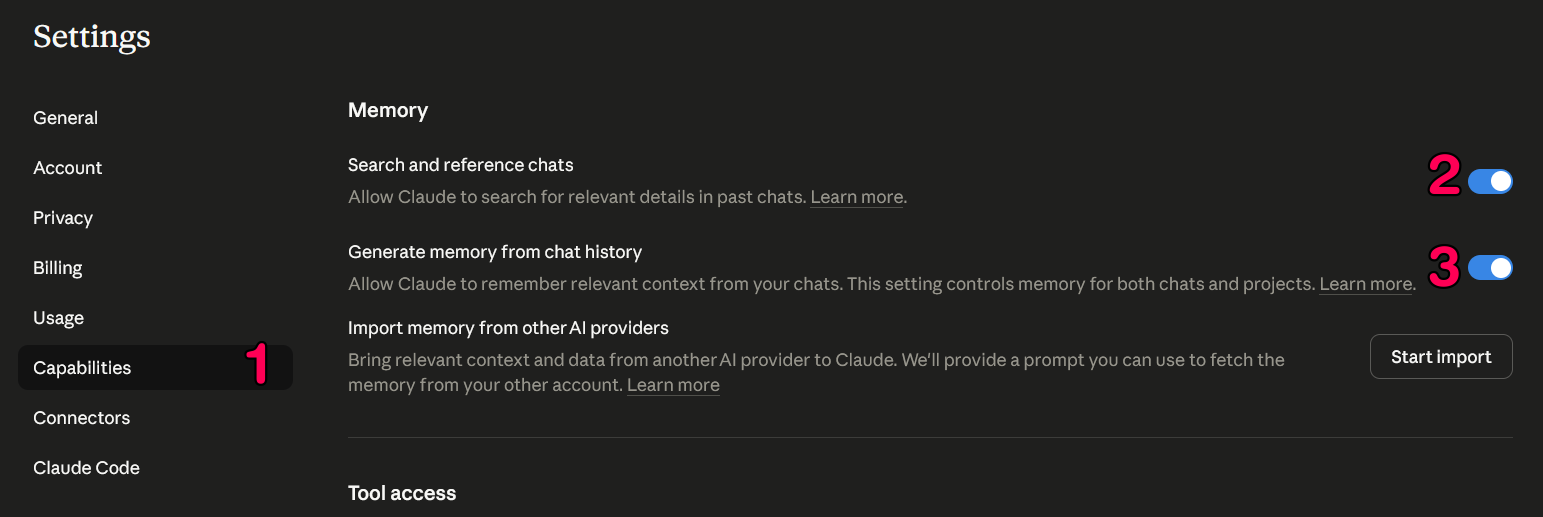
Turn On Memory
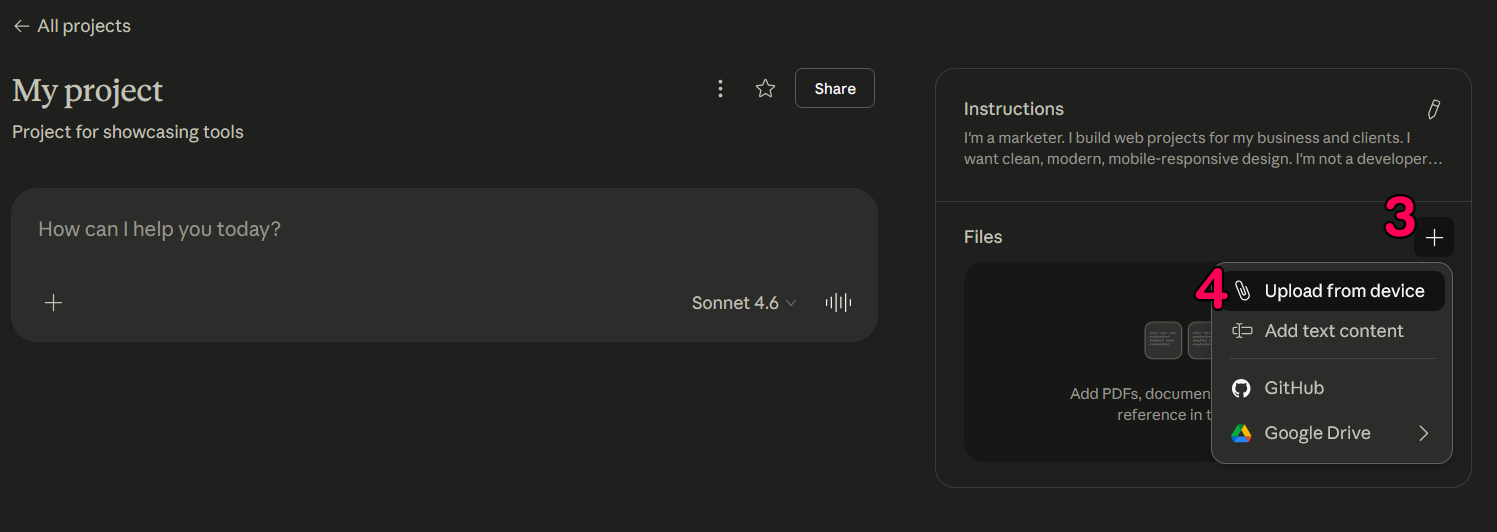
Create a Project for Your Business

Set Up Custom Writing Styles
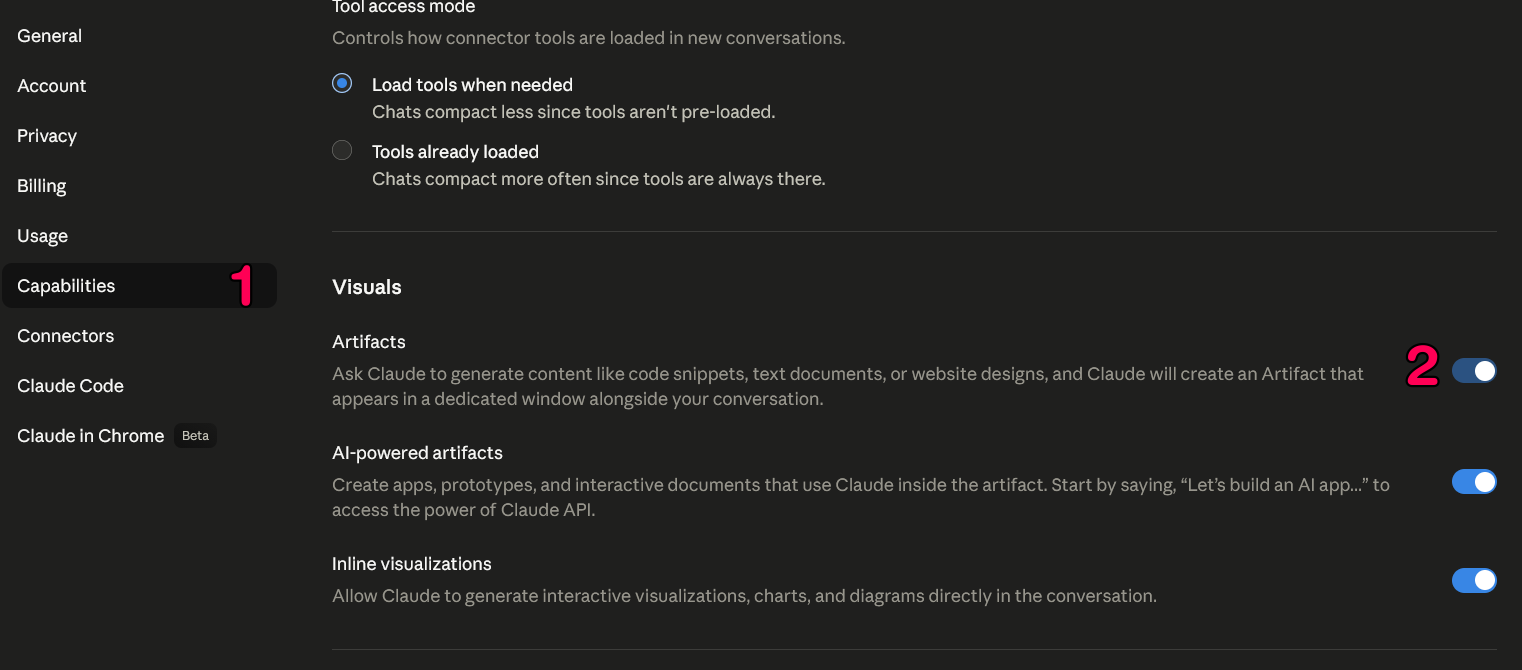
Understand Artifacts
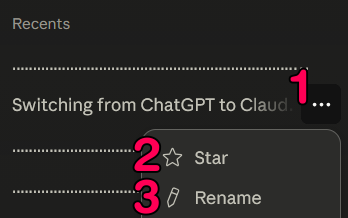
Star and Rename Your Best Chats
Pick the Right Model
Common Mistakes
- ×Chatting like a search engine • Asking one-off questions in regular chats, then closing the tab. You'll get an answer, but Claude forgets everything.
- ×Defaulting to Opus • Opus uses 3–5x the tokens of Sonnet. Most daily tasks don't warrant it. Save it for deep reasoning and long documents.
- ×Scanning without direction • "Read this folder and tell me what's useful" burns tokens and returns vague output. Tell it exactly what you need and where to look.
- ×One project for everything • Mixing clients or functions in a single Project means context bleeds. Sales conversations shouldn't reference your IT docs.
- ×Skipping memory • Building Projects without enabling memory means Claude forgets who you are the moment you leave the Project.
Prompting Tips That Actually Change Results
Most business owners get mediocre output because of how they ask, not what they ask for. Three changes that make the biggest difference:
Give context upfront
Before
“Write me a proposal.”
After
“Write a proposal for a coach with 2,000 followers who runs a 6-week 1:1 program at $3,500. Keep it under 400 words with a problem/solution/investment structure.”
Specify the format
Before
“Summarize this contract.”
After
“Summarize this contract because I'm deciding whether to sign. Flag cash flow risks and lock-in clauses specifically.”
Tell Claude what you need it for
Before
“Write an email to my client.”
After
“Write a follow-up email to a client who went quiet after our proposal. Tone: warm but direct. Goal: book a 15-minute call this week.”
The pattern: more context, a specific format, and a clear reason. Those three changes alone will double the usefulness of your Claude output.
The fastest way to write better prompts is to stop typing them. WisprFlow lets you hold a key and dictate directly into any text field on your screen. You talk 4x faster than you type, and spoken prompts tend to be more detailed and conversational... which means significantly better output from Claude. First month free with that link.
Frequently Asked Questions
More from the Lab
How We Cut Cost Per Lead from $16 to $5.43
The creative strategy framework behind it. Same budget, same targeting. Different creative.
Read →--meta-adsMeta Ads Credit Card Deadline: What to Do Before April 1st
How to switch billing, what it means for cash flow, and the exact message to send each type of client.
Read →--lead-genFacebook Lead Forms vs Landing Pages
Which funnel setup actually converts and when to use each.
Read →--ai-toolsClaude vs ChatGPT for Coaches and Consultants
Which AI actually does the work? Architecture, persistence, and compounding compared.
Read →--ai-toolsControl Your Computer From Your Phone Using Claude
Step-by-step Remote Control setup. No coding required. 10 minutes.
Read →--claude-codeClaude Code Slash Commands That Actually Matter
The slash commands that build persistent context instead of disposable chats. /init, /memory, /compact, /plan, and custom skills.
Read →--claude-codeClaude Code Routines: Run Your Work Without Being There
Saved AI sessions that run in Anthropic's cloud on a schedule, webhook, or GitHub event. Four routines that cut the Supervision Tax in half.
Read →--claude-codePut Video on Your Service Page Without a Video Team
Claude Code writes the code, Remotion renders the MP4. Roughly ten minutes from cold machine to a thirty-second branded promo for the page that matters most.
Read →--case-studyInside a Restaurant Franchise Intelligence Platform We Built
A role-based dashboard platform that automated POS data, financial reporting, and store performance across a multi-location restaurant franchise.
Read →--geminiGemini Multimodal: The AI That Sees Your Work
When to use Gemini instead of Claude or ChatGPT. Video, photos, recordings, and image generation for coaches and consultants.
Read →--email-deliverabilityGet Out of Spam — Or Keep Losing Revenue in Silence
Why your emails land in spam and the infrastructure framework for fixing it.
Read →--ai-videoAI Motion Control: Cinematic Video with Higgsfield
Create cinematic AI video using Higgsfield. No camera crew, no budget.
Read →--meta-adsHiggsfield MCP: Four-Variant Ad Pipeline From One Prompt
Install Higgsfield as a Claude Code connector. One prompt produces four awareness-stage video ads, Reels-vertical, ready for Meta Ads Manager upload.
Read →--meta-adsRun Meta Ads from Claude (Official MCP Guide)
Install Meta's official MCP for Claude Desktop, Claude.ai, or ChatGPT, or the Meta Ads CLI for Claude Code. Free during open beta, no developer app required.
Read →--meta-adsClaude Cowork for Creative Strategists
Three saved Cowork prompts that compress Meta-ads research: Ad Library teardowns, multi-brand monitoring, and review-to-persona research feeding the next brief.
Read →--free-toolClean Copy — Make AI Text Sound Human
Free browser tool that strips AI tells from your copy. Paste, pick a mode, get human output.
Try it →--free-courseLearn Claude Code — Free 5-Lesson Video Course
Set up VS Code with Claude Code, build a landing page, and deploy live with Vercel. Five lessons, no coding experience required.
Watch free →--ai-toolsHow to Switch from ChatGPT to Claude (And Why It Matters for Your Business)
Where Claude outperforms ChatGPT for business work, and how to bring your ChatGPT context into Claude in about twenty minutes.
Read →--ai-toolsClaude Cowork: Stop Asking. Start Delegating.
Getting started with Claude Cowork. Covers Global Instructions, autonomous tasks, and saved Skills. For business owners who want to delegate, not just chat.
Read →// free course
Want the free course?
Five lessons. By the end you have a live site, version control protecting your work, and Claude Code set up the right way.
Free. No spam. Just the lessons.
Want Claude Configured for Your Business?
We set up the full system: projects, prompts, workflows, and custom instructions trained on your actual content.
// One client per quarter
Talk to UndeniableNo commitment. No pitch deck. Just a straight conversation about your business.